Showing posts with label BLOGGER. Show all posts

12 November 2009

Get your INDIC language by typing in ENGLISH

Many of us would feel to write certain things in our mother tongue rather than in English. There is an easy way to get the words written in our mother tongue by typing in English. Great isn't it?
             

Blogger:
Blogger has a feature that helps users to type in their own Indic languages. It helps the user to publish the post in their own language. But Blogger gives only 5 languages...


Google Transliterate:
Recently Google Labs introduced the Google Transliteration using which the typed contents be got in the respective Indic languages that a user wishes. This feature of Google provides transliteration for 11 Indic languages...


14 July 2008

To Remove the Content Warning in BLOGGER

In Blogger, FLAG BLOG is the special option used to notify the Objectionable content.
If user found any copyrights, illegal content in your blog, they can easily flag it.


If user notify FLAG BLOG many times in your blog, then you get CONTENT WARNING message in our blogger.


If you want to remove the warning message in Blog,
Click SETTINGS then click Basic.


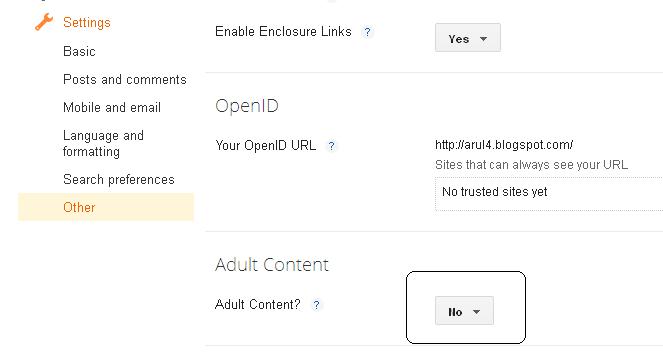
Now you can get the following page, Scroll down the page and Choose Adult Content?

If you choose 'Yes' button the warning message will Appear.
If you choose 'No' the warning message will not Appear.


Click Save Settings and you can view Blog, the message will not appear.


Updated:

In the New Screen format:

Settings -> Other -> Adult Content - > No


-